
Updated 16.03.2026
eCommerce Loans
REST API Integration
Introduction
This document describes Teya's eCommerce loan integration using the Consumer Loans API v3 (REST). It enables merchants to offer consumer loans through an eCommerce website. Customers apply for a loan during checkout, confirm their identity via electronic identification, and finalize the loan in one step.
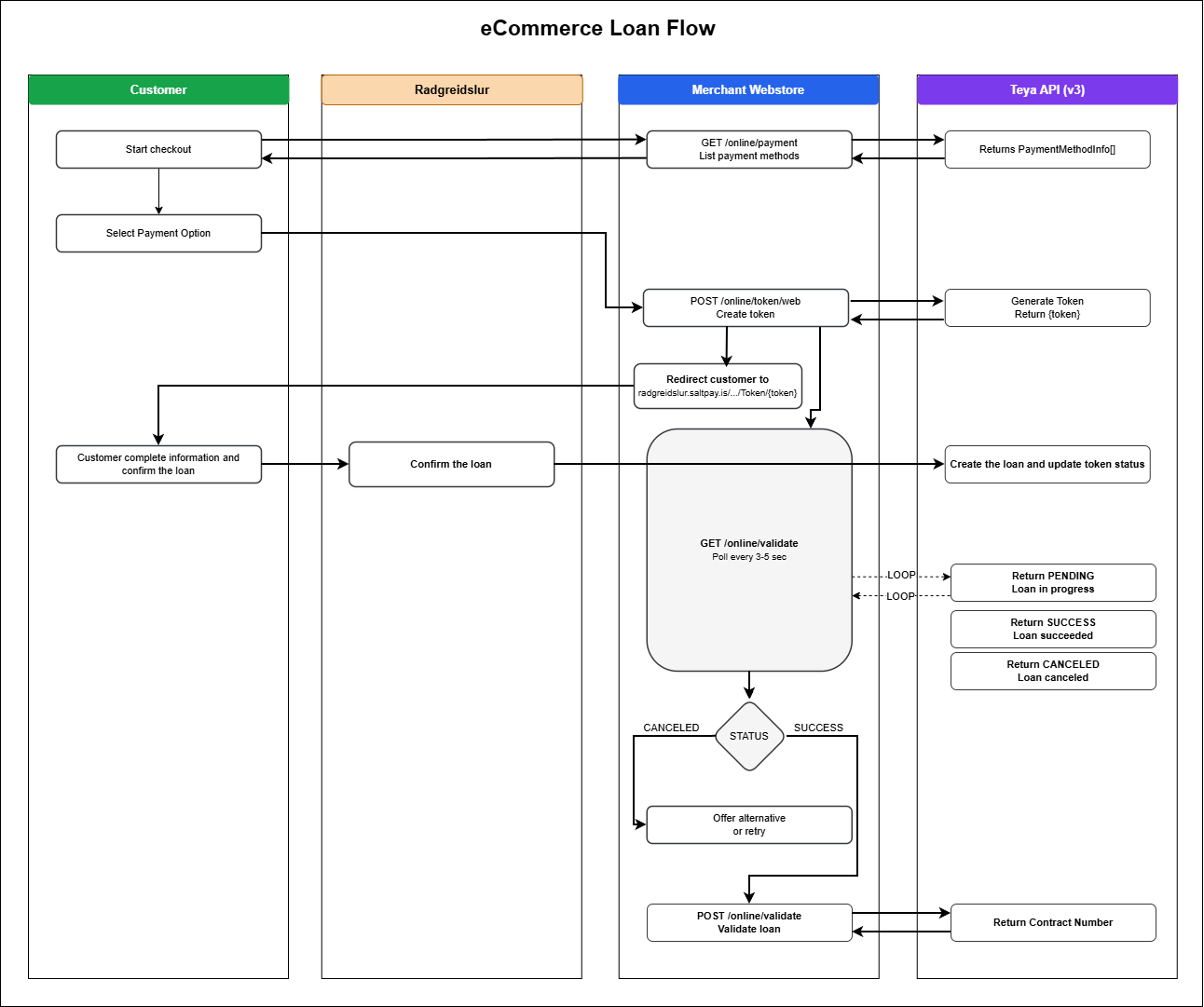
eCommerce loan process
The eCommerce loan is a process between the merchant's webstore and Teya's consumer loan service.
- Customer adds products to cart and proceeds to checkout. Call
GET /online/payment(List Payment Methods) to display available payment options. Customer enters personal information and selects a payment option. - Merchant's webstore stores information about the product(s), customer, and any other relevant data.
- Create a token for the customer by calling
POST /online/token/web(Create Token). - Redirect the customer to Teya's self-service portal using the token:
https://radgreidslur.saltpay.is/Umsokn/Login/Token/{token} - The webstore goes into waiting for payment mode and calls
GET /online/status(Check Loan Status) every 3-5 seconds to monitor loan progress. - Customer provides credit card information and completes the loan authorization process on Teya's portal.
- a) The webstore receives SUCCESS status from
GET /online/status. The webstore callsPUT /online/validate(Validate Loan) to validate the loan and receive contract details (ContractNumber, AuthorizationNumber, SocialSecurityNumber).
b) The webstore receives CANCELED status. Merchant can offer another payment option or allow the customer to try again. - Display success text along with delivery/pickup information for the customer.
Process deviations
- The webstore calls
PUT /online/cancel(Cancel Loan) to cancel the process. Loan status updates to CANCELED. - Status is set to TOKENEXPIRED when the redirect URL has not been opened within the time set by TokenValidMinutes. The webstore must create a new token and restart the process.
- Status is set to PROGRESSEXPIRED if the customer opened the URL but did not finish or cancel within ProgressValidMinutes. The webstore must create a new token and restart.
- Status is set to FAILED if
PUT /online/validate(Validate Loan) is not successful. The response will provide failure details.
Loan advertisement
Most webstores adverties loan ratings that customer can have for all products that qualify. The Consumer Agency requires that certain information is shown. That can be done by calling the Consumer Loans API webservice LoanAdvert method and showing key information along with product price as shown in image 1.

Image - 1 Loan advertisement example for a product in an eCommerce website